
PlayFab Hub
On this page
Service requirements: A PlayFab account/title and the separate PlayFab Unity SDK are required. PlayFab usage and optional Azure/platform services can incur charges. Review pricing and terms. Mind Invaders Games is independent of Microsoft; this package does not include a hosted backend or production gameplay policies.
Read Getting started, per-feature PlayFab setup, Authentication, Reliability / IAP limits, and Server integration before using the samples. UGC write handlers are customer supplied and configurable; they are not bundled. Receipt helpers target legacy Economy v1, even when v2 is selected. Unity IAP checkout/order recovery and v2 real-money redemption are not included.
PlayFab client integration and editor administration for Unity.
PlayFab Hub bundles two complementary toolsets that were built to work together:
| Half | Assembly | Runs in | What it is |
|---|---|---|---|
| Client integration | MoDev.PlayFabHub.Runtime + MoDev.PlayFabHub.Editor |
Player build + Editor | A ScriptableObject-configured wrapper over the PlayFab client SDK. Tick features in a Hub window, call typed managers from game code. |
| Admin Hub | MoDev.PlayFabAdmin.Editor |
Editor only | A live-ops admin dashboard over secret-key REST — push economy, deploy CloudScript, edit Title Data/News, moderate UGC, ban players, inspect accounts, run health checks. Nothing here ships in your build. |
PlayFab-native, cost-conscious. Server logic defaults to Legacy CloudScript (JavaScript) — PlayFab-hosted, no Azure subscription required. Azure Functions is opt-in (and warns about cost). The Admin Hub talks straight to PlayFab over REST, with no additional publisher-hosted service. PlayFab usage charges and limits still apply.
- Hub window (Client + Admin tabs):
Tools ▸ MoDev ▸ PlayFab Hub ▸ Hub - Onboarding & SDK status:
Tools ▸ MoDev ▸ PlayFab Hub ▸ Setup and Helpincludes a direct link to the tested SDK download and manual import instructions. Unity registry dependencies are declared in the Asset Store archive. - Documentation:
Tools ▸ MoDev ▸ PlayFab Hub ▸ Documentation(opens the offline docs below) - Runtime API root:
MoDev.PlayFabHub.PlayFabHub - Interactive docs: open
Documentation/index.htmlin a browser, or read the linked HTML guides. Publisher website.
Part 1 — Client integration
A wrapper around the PlayFab client SDK. Configure once, call typed managers — no callback plumbing, no SDK archaeology.
Setup
- Open
Tools ▸ MoDev ▸ PlayFab Hub ▸ Hub(Client Hub tab) → Create Settings Asset. It is created in your project atAssets/PlayFabHub/Resources/(under aResources/folder so the runtime loads it automatically — the asset lives in yourAssets/, never inside the package). - Advanced page → set your Title ID (or leave empty to reuse the SDK's shared
PlayFabSettings.TitleId). - Enable the features you need (Auth on by default). Each feature page configures only that feature.
- Initialize once at startup:
using MoDev.PlayFabHub;

PlayFabHub.Initialize();              // loads the Resources settings asset
// email and password come from your login form; register new accounts first.
PlayFabHub.Auth.LoginWithEmail(email, password, r =>
{
    if (r.Ok) Debug.Log("Logged in: " + r.Data.PlayFabId);
    else      Debug.LogWarning(r.Error);
});
Or tick Auto-initialize on load (Overview page) to init before the first scene — off by default so it never collides with an existing PlayFab bootstrap.
Feature map
Every manager returns a unified HubResult<T> (Ok + Data, or Error) via a callback,
and raises cross-cutting events on PlayFabHubEvents.
| Accessor | Manager | What it does |
|---|---|---|
PlayFabHub.Auth |
AuthManager | Login (anonymous/device/email/Google Play/Apple), register, recovery, link/unlink, entity token |
PlayFabHub.Data |
DataManager | User Data, Entity Objects (v2, typed get/set/delete), profile, Title Data (cached, typed GetTitleDataObject<T>), Title News, CDN content |
PlayFabHub.Economy |
EconomyManager | Catalog + inventory + purchase + consume, v2 default / v1 selectable, receipt validation |
PlayFabHub.Leaderboards |
LeaderboardManager | Stats + global/around-me/friend boards; write-authority gated; statistic versions (seasons) + archived-board reads |
PlayFabHub.CloudScript |
CloudScriptManager | Typed Execute<T> / ExecuteChecked<T> (handler {ok,error} envelopes) → Legacy CloudScript (PlayFab-hosted) or opt-in Azure Functions |
PlayFabHub.Social |
SocialManager | Friends + Groups/Clans + shared group data (documents on the group entity) |
PlayFabHub.Analytics |
AnalyticsManager | Queued custom events (one request per event; best-effort timer/pause flush) |
PlayFabHub.LiveOps |
LiveOpsManager | Segments (read), A/B treatment, Title News, scheduled events (Title Data start/end windows) |
PlayFabHub.Notifications |
NotificationManager | Android/iOS push registration, contact email |
PlayFabHub.Multiplayer |
MultiplayerManager | Lobby + Matchmaking with ticket polling (interval/timeout/cancel) — advanced, off by default |
A disabled feature's accessor returns null, so guard with it (or check PlayFabHub.Has<T>()).
Examples
// Economy (v2 default)
PlayFabHub.Economy.SearchItemsV2("type eq 'catalogItem'", null, null, r => { /* r.Data.Items */ });

// Leaderboard
PlayFabHub.Leaderboards.GetLeaderboard("best_time", 0, 25, r => { /* r.Data.Leaderboard */ });

// Last season's final board (statistic versions = seasonal resets)
PlayFabHub.Leaderboards.GetPreviousSeasonLeaderboard("best_time", 0, 25, r => { ... });

// Server-authoritative grant via CloudScript (PlayFab-hosted JS).
// ExecuteChecked also fails the result when the handler answers { "error": ... }.
PlayFabHub.CloudScript.ExecuteChecked<MyResult>("grantDailyReward", new { day = 3 }, r => { ... });

// Legacy v1 Google Play / Apple unified receipt validation (not v2 redemption).
// Confirm only after successful fulfillment; persist/reconcile pending orders in your game.
PlayFabHub.Economy.ValidateReceipt(order.Info.Receipt, "USD", 799, r =>
{
    // Your implementation must verify fulfillment and reconcile duplicates before confirming.
    HandleValidationAndReconcile(order, r);
});

// What's live right now? (Title Data start/end windows, highest priority first)
PlayFabHub.LiveOps.GetActiveEvents(r => { /* r.Data[0].GetPayload<MyBoost>() */ });

// Shared clan document (entity object on the group entity)
PlayFabHub.Social.GetGroupObject<ClubGoals>(groupId, "Goals", r => { ... }, new ClubGoals());

// Matchmaking with one completion edge and a working Cancel button
var poll = PlayFabHub.Multiplayer.FindMatch(null, r => { ... }, s => label.text = s);
cancelButton.onClick.AddListener(poll.Cancel);

// Cross-cutting events
PlayFabHubEvents.OnLoginStateChanged += loggedIn => { ... };
PlayFabHubEvents.OnInventoryChanged  += () => RefreshShopUI();
More on seasons, group data, scheduled events and matchmaking polling:
Documentation/seasons-groups-events.html.
Server authority (important)
The client may read segments/variants/news and spend/consume its own items. Granting
currency/items, validating real-money receipts, and writing competitive scores must be
server-side — route them through PlayFabHub.CloudScript (set a leaderboard's
writeAuthority to CloudScript/ServerOnly). The title secret key never ships in the
runtime build. (The Admin Hub in Part 2 is where you author those server-side operations.)
Part 2 — Admin Hub (editor-only)
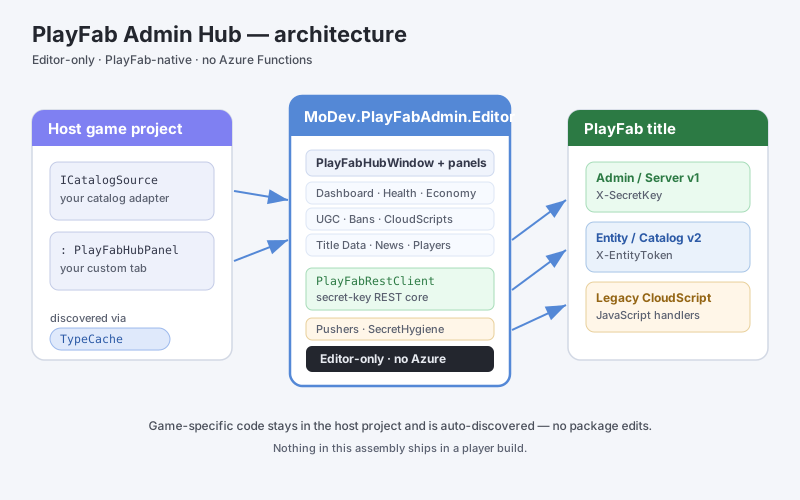
A single Unity Editor window that drives every routine live-ops task against your PlayFab
title. Everything talks to PlayFab directly over secret-key REST — no Azure Functions,
no separate backend, nothing to deploy. The whole admin assembly is includePlatforms:
["Editor"], so none of it ships in player builds.
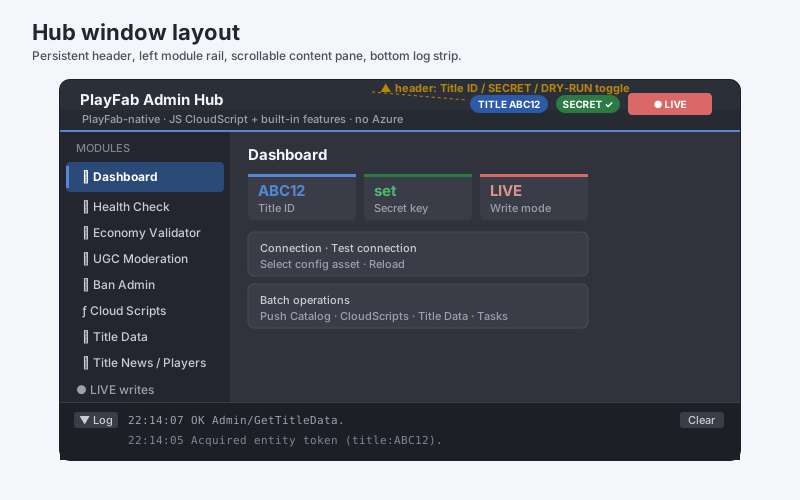
Open Tools ▸ MoDev ▸ PlayFab Hub ▸ Hub and switch to the Admin Hub tab — a left module rail, a
content pane, a persistent header (Title ID / secret status / DRY-RUN toggle) and a bottom
operation-log strip. Each panel below is a tab.
- Dashboard — stat tiles (Title ID, secret presence, DRY-RUN/LIVE, catalog version), a live Test connection probe, a local-authoring-asset count, and one-click batch pushers (Catalog, Cloud Scripts, Title Data, Scheduled Tasks) plus Validate Segments and a handler Smoke Test. All writes respect dry-run.
- Health Check — one readiness report: local project checks plus live PlayFab probes (title reachable, Economy v2 responding, CloudScript handlers deployed, segments defined), color-coded Pass/Warn/Fail/Unknown.
- Economy Validator — a read-only three-layer gate: (a) local referential checks on your
ICatalogSource(duplicate/blank ItemIds, dangling cosmetic refs), (b) a post-push diff of the live v1 catalog vs your authoring source, (c) an Economy v2 content-type probe (GetCatalogConfig). - UGC inspection + optional handler adapter — lists Economy v2 user-generated items (title, creator, rating, plays, report reason) with KEEP / REMOVE / FEATURE actions and a Rotate featured pass, routed through your deployed CloudScript handlers. Writes respect dry-run.
- Ban Admin — ban by PlayFab ID (reason + optional duration; blank = permanent), look up bans, revoke (all or individual) via
Admin/BanUsersetc. Writes respect dry-run. - Cloud Scripts — lists local
.jshandlers, previews them, deploys as one bundled revision (Deploy-merge or Replace-only), and shows the live revision. Deploys respect dry-run. - Title Data — live key/value editor for public and Internal Title Data; edit/add/delete keys, Push changed writes only dirty rows. Respects dry-run.
- Title News — list (
Server/GetTitleNews) and compose/publish (Admin/AddNews) news for your in-app inbox, with an optional{"coins":N}reward line and a live body preview. - Players — inspect a player (profile, currencies, v1 inventory, lifetime spend) and grant/revoke virtual currency. Grants respect dry-run.
- Config — in-window settings (Title ID override, catalog version, dry-run), shows where the secret resolves from without exposing it, and can clear the cached entity token.
Game integration (the seams) — zero package edits
Anything game-specific stays in your project and is auto-discovered:
- Catalog push — implement
ICatalogSource. Add a class implementingMoDev.Editor.PlayFabAdmin.ICatalogSource; the pusher and Economy Validator discover it viaTypeCache. No package code references your game types. - Custom panels — derive from
PlayFabHubPanel. Add a class deriving fromMoDev.Editor.PlayFabAdmin.Hub.PlayFabHubPanel; the Hub discovers and appends it automatically, with the shared secret/dry-run plumbing for free.
Security
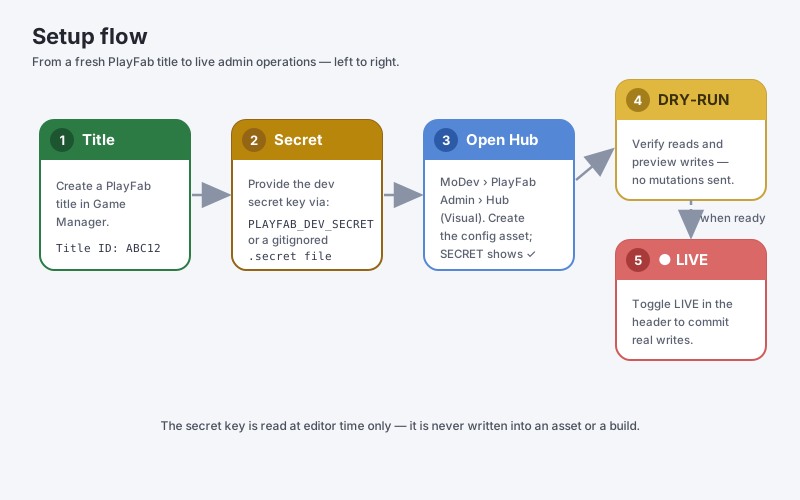
- The developer secret key is resolved at editor time only, from the
PLAYFAB_DEV_SECRETenvironment variable or a gitignored.secretfile atAssets/Editor/PlayFabAdmin/.secret(a path in your project, not in the package). It is never serialized into an asset, never committed, and never compiled into a build. SecretHygieneensures.gitignorecovers the.secretfile and errors loudly if it is already git-tracked (so you cangit rm --cachedit and rotate the key).- The Hub uses secret-key REST, never the PlayFab Admin SDK; the Admin SDK source stays
disabled (
ENABLE_PLAYFABADMIN_APIoff), so no admin API leaks into a player build. - Entity tokens are fetched once and cached in memory only, per title, until shortly before expiry.
This package contains no secret, Title ID, or config asset. Your developer secret is resolved at editor time only (the
PLAYFAB_DEV_SECRETenv var or a gitignored.secretfile in your project) — never serialized into an asset, never committed, never in a build.
Requirements
- PlayFab Unity SDK present in the project (
github.com/PlayFab/UnitySDK). Not bundled — you supply it. The assemblies referencePlayFab/PlayFabSDKEditor(the SDK's JSON serializer andPlayFabSettings.TitleId). - Tested editors: Unity 2022.3.44f1 and Unity 6000.4.6f1. Tested prerequisite: PlayFab Unity SDK 2.230.260123. Other versions require validation.
- TextMeshPro (part of uGUI 2.0 on Unity 6; TextMeshPro 3.0.6 installed separately on 2022.3) — used by the uGUI samples and the sample-scene generator.
- No additional JSON/editor-UI libraries — the editor UI is plain IMGUI and JSON goes through the SDK's bundled serializer, so there is nothing else to install.
Required PlayFab setup
- Create a PlayFab title at the PlayFab Game Manager and note its Title ID.
- For the Admin Hub, get your Developer Secret Key (title Settings ▸ Secret Keys) and supply it via the
PLAYFAB_DEV_SECRETenv var or the gitignored.secretfile (see Security). - For UGC moderation, enable Economy v2 and register your content type under Catalog Config →
UserGeneratedContent.ContentTypes.
Documentation
Documentation/index.html— the interactive, web-deployable docs (with package + doc version badges and a screenshot gallery).Documentation/— getting-started, configuration, extending, prerequisites and troubleshooting guides, plus seasons / group data / scheduled events / matchmaking polling.- In the editor:
Tools ▸ MoDev ▸ PlayFab Hub ▸ Documentation, or the PlayFab Hub Docs button in Setup & Help.
FAQ
I imported the package but there are no windows / no code — just a "Setup" notice. Broken?
No — working as designed. The whole package is gated behind the PLAYFAB_PRESENT scripting
define, which is set automatically the moment the PlayFab Unity SDK is detected in the project.
Without the SDK the package compiles with zero errors and shows only the Setup & Help
window (which walks you through installing the SDK). Install the SDK and the real tools
compile themselves in; no manual defines, no restarts.
How do I plug my game's catalog / my own admin panels into the Hub?
You don't edit the package. Implement MoDev.Editor.PlayFabAdmin.ICatalogSource (catalog
push + Economy Validator input) or derive from MoDev.Editor.PlayFabAdmin.Hub.PlayFabHubPanel
(a new tab in the Admin rail) anywhere in your project — both are discovered automatically
via Unity's TypeCache. Delete your class and the Hub simply drops the entry.
Can the Admin Hub accidentally write to my live title while I explore? It starts in DRY-RUN: every mutating call is previewed in the operation log and never sent. You flip to LIVE explicitly with the header toggle (it renders red), and can flip back at any time. Read-only calls (inspection, health checks) are always allowed.
Where do my Title ID and secret key live?
Your Title ID lives in a settings asset created in your Assets/ folder — never inside
the package, which ships with no config asset at all. The developer secret key is resolved
at editor time only, from the PLAYFAB_DEV_SECRET environment variable or a gitignored
.secret file; it is never serialized, committed, or compiled into a build.
Where are the sample scenes?
The Asset Store archive includes all six saved Login, Leaderboard, and Shop scenes under
Assets/PlayFabHub/Samples/. Install the separate PlayFab SDK and the UI dependencies,
then import TMP Essential Resources before opening the uGUI scenes. In a UPM install,
import all four sample entries from Package Manager, including Common, or run
Tools ▸ MoDev ▸ PlayFab Hub ▸ Generate Sample Scenes after setup. The generator writes
new scenes to Assets/PlayFabHub/Samples/Scenes/; copy a scene before customizing it.
Why isn't the PlayFab SDK bundled?
Microsoft distributes it under its own terms and updates it frequently; bundling a stale
copy would conflict with the one many projects already have. You install it once from
github.com/PlayFab/UnitySDK (see Third Party Notices.html).
Support
Questions, bug reports, or feature requests: mindinvadersgames@gmail.com · Website: mindinvadersgames.com
License
See LICENSE.html and Third Party Notices.html.
Release reliability
Reads and explicitly idempotent writes can retry. Legacy purchases and arbitrary CloudScript do not replay automatically. Shutdown disposes owned timers/subscriptions and resets static state for domain-reload-disabled Play mode. See reliability for cancellation, store reconciliation, and analytics limitations.